 0
0
 0
0
The Prime Video short-form Clips feature has officially been introduced as Amazon expands its streaming platform with a TikTok-style video experience designed for mobile users.
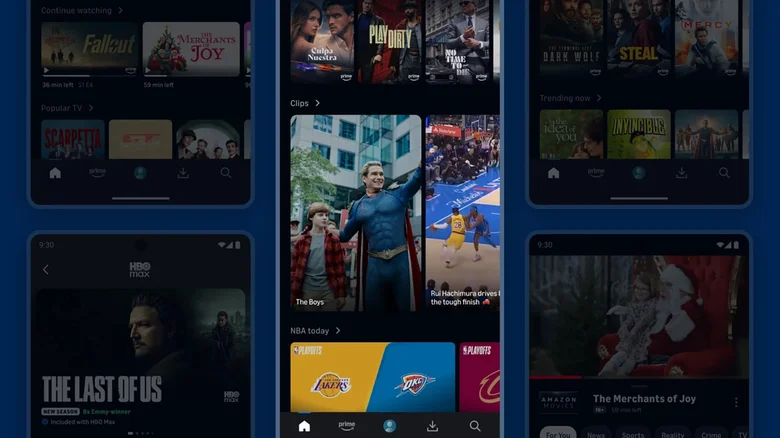
Prime Video now includes a new feed of short, shareable video clips called “Clips,” allowing users to browse bite-sized content taken directly from movies, TV shows, and live broadcasts.
The update reflects a growing trend in streaming platforms adopting short-form video formats to increase user engagement and content discovery.
What the New Clips Feature Offers
The newly launched Clips feature is designed to make content more interactive and easily shareable.
How the Clips Feed Works
Users can access the feature by:
- Opening the Prime Video mobile app
- Scrolling down the home page
- Selecting the “Clips” carousel
- Tapping individual short videos to watch
Each clip is a short segment taken from longer Prime Video content, making it easier for users to preview shows and movies.
Content Available in Clips
The Clips feed includes:
- Scenes from Prime Video original series
- Highlights from movies and shows
- Short segments from live sports broadcasts
- Promotional highlights for trending content
The Prime Video short-form Clips feature aims to enhance discovery across Amazon’s streaming ecosystem.
Inspired by TikTok-Style Short Video Trends
The design of the new feature closely mirrors the vertical scrolling format popularized by short-video platforms.
Rise of Short-Form Video Consumption
Short-form video content has become dominant across digital platforms due to:
- Fast and engaging viewing experience
- Mobile-friendly vertical scrolling design
- Algorithm-driven content discovery
- High user retention rates
Platforms like TikTok have influenced how users consume entertainment, pushing streaming services to adapt similar formats.
Streaming Platforms Adapting to User Behavior
Many companies are now integrating short-form content into traditional streaming apps to:
- Increase user engagement
- Promote longer watch sessions
- Highlight trending content more effectively
Expansion Beyond Sports Content
Initially, Clips was introduced with a focus on sports content, particularly NBA broadcasts on Prime Video. However, the feature is now expanding beyond sports.
Broader Content Integration
The updated Clips system is expected to include:
- Popular TV series highlights
- Original Amazon productions
- Movie previews and scenes
- Entertainment highlights from various genres
This expansion strengthens the Prime Video short-form Clips feature as a general discovery tool rather than a sports-only function.
Impact on Amazon’s Streaming Strategy
The introduction of Clips reflects Amazon’s broader strategy to improve engagement on its streaming platform.
Enhancing User Discovery
The feature helps users:
- Discover new shows faster
- Preview content before watching full episodes
- Engage with trending clips
- Share content more easily on social media
Competitive Positioning in Streaming Market
With increasing competition among streaming platforms, Prime Video is focusing on:
- User engagement tools
- Interactive viewing experiences
- Social-style content discovery
How Users Can Access Clips
The feature is integrated directly into the mobile app interface.
Step-by-Step Access
To view Clips:
- Open the Prime Video mobile app
- Scroll through the homepage
- Locate the Clips section
- Tap any clip to start viewing
The experience is designed to be seamless and integrated into regular browsing.
Industry Trend Toward Short-Form Content
The Prime Video short-form Clips feature is part of a wider shift in digital entertainment.
Why Platforms Are Adopting Short Clips
Key reasons include:
- Short attention spans among mobile users
- Growth of mobile-first content consumption
- Higher engagement rates with bite-sized content
- Viral sharing potential across platforms
Influence on Future Streaming Models
Experts suggest that streaming services may increasingly:
- Blend long-form and short-form content
- Use algorithm-driven clips to recommend shows
- Incorporate social media-like features
User Reactions and Industry Discussion
While Amazon has introduced the feature as an enhancement, reactions may vary among users.
Potential Benefits Highlighted
- Easier content discovery
- Faster previews of shows
- More engaging mobile experience
Possible Concerns
- Cluttered user interface
- Overemphasis on short-form content
- Shift away from traditional viewing habits
FAQ: Prime Video Short-Form Clips Feature
What is the Prime Video Clips feature?
It is a new short-form video feed that shows shareable clips from movies, shows, and live content on Prime Video.
How do users access Clips on Prime Video?
Users can scroll down the mobile app homepage and tap the Clips carousel to view short videos.
Is Clips similar to TikTok?
Yes, it uses a similar vertical short-video format designed for quick browsing and engagement.
What type of content is included in Clips?
Clips include TV show highlights, movie scenes, sports moments, and promotional content.
Conclusion
The Prime Video short-form Clips feature represents Amazon’s latest move into the growing short-video ecosystem. By introducing a TikTok-style feed within its streaming platform, Prime Video aims to improve content discovery, increase engagement, and adapt to evolving digital consumption habits.
As streaming platforms continue to compete for attention, features like Clips may play a key role in shaping the future of how audiences discover and interact with entertainment content.
Click here fpr more news