 0
0
 0
0
The Windows 11 Xbox Mode guide has become increasingly popular among PC gamers looking for a console-like experience without sacrificing the power and flexibility of a gaming computer. Thanks to recent software tools and Windows enhancements, users can now transform a gaming laptop or desktop into an interface that closely resembles an Xbox console.
Instead of navigating traditional Windows menus, Xbox Mode allows gamers to launch directly into a controller-friendly environment designed for gaming. Combined with system optimization and performance tweaks, the setup can create a smoother and more streamlined gaming experience.
This approach has gained attention among enthusiasts who want the convenience of a console while still benefiting from PC hardware capabilities.
What Is Xbox Mode on Windows 11?
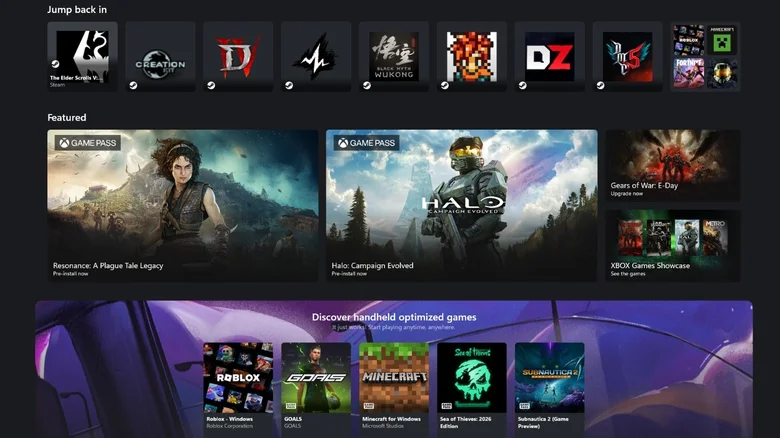
Xbox Mode is a special full-screen gaming interface built into Windows 11 that provides a console-like environment.
The feature focuses on controller navigation, simplified menus, and quicker access to games without requiring users to interact with the standard Windows desktop.
For many players, this creates an experience that feels much closer to using an Xbox console.
Key Features of Xbox Mode
Xbox Mode offers several benefits for gamers:
• Controller-friendly navigation
• Simplified user interface
• Faster access to installed games
• Reduced desktop distractions
• Improved gaming-focused experience
The feature is particularly appealing for users who connect gaming PCs to televisions and use them as living room entertainment systems.
Why Gamers Are Interested
Modern gaming laptops and compact gaming PCs can deliver performance levels that rival or exceed current consoles.
With Xbox Mode, users can combine:
• PC game libraries
• Console-style navigation
• High-performance hardware
• Access to multiple gaming platforms
• Flexible upgrade options
This combination creates a unique gaming environment.
Start With a Clean Windows 11 Installation
A clean operating system often provides the best foundation for a gaming-focused setup.
The Windows 11 Xbox Mode guide typically begins with reducing unnecessary background applications and removing software that may consume system resources.
Benefits of a Fresh Installation
A fresh Windows installation can help:
• Improve system responsiveness
• Reduce startup times
• Remove unwanted software
• Free storage space
• Improve gaming performance
Users with older installations may also benefit from cleaning and optimizing their existing systems.
Removing Unnecessary Features
Many gamers choose to disable or remove features that are not essential for gaming, such as:
• Widgets
• Background applications
• Unused cloud services
• Excess notifications
• Resource-heavy startup programs
Reducing background activity allows more system resources to be allocated to games.
Optimizing Windows 11 for Gaming
System optimization plays an important role in maximizing gaming performance.
The Windows 11 Xbox Mode guide often includes adjustments that prioritize gaming workloads.
Performance Settings
Windows offers several settings that can help improve gaming responsiveness.
Common adjustments include:
• Enabling high-performance power plans
• Disabling unnecessary visual effects
• Reducing background tasks
• Limiting startup applications
• Optimizing storage performance
These changes may help improve frame rates and reduce interruptions during gameplay.
Privacy and Telemetry Adjustments
Some users also reduce data collection and background services to minimize system activity.
Potential benefits include:
• Lower resource usage
• Fewer background processes
• Improved responsiveness
• Reduced network activity
However, users should carefully review any settings before making changes.
Graphics Card Optimization
The performance of any gaming system depends heavily on its graphics hardware.
Whether using AMD or Nvidia graphics, proper configuration can improve overall gaming results.
Nvidia Graphics Settings
Users with Nvidia graphics cards often adjust settings such as:
• Shader caching
• Power management
• Texture filtering
• Vertical synchronization
• Performance optimization
These changes may help improve consistency and reduce stuttering in some games.
AMD Graphics Features
AMD users can benefit from features available through Radeon software.
Popular options include:
• Automatic overclocking
• Gaming optimization profiles
• Image enhancement features
• Performance-focused settings
• Driver-level improvements
The exact results vary depending on hardware and game requirements.
How Xbox Mode Works
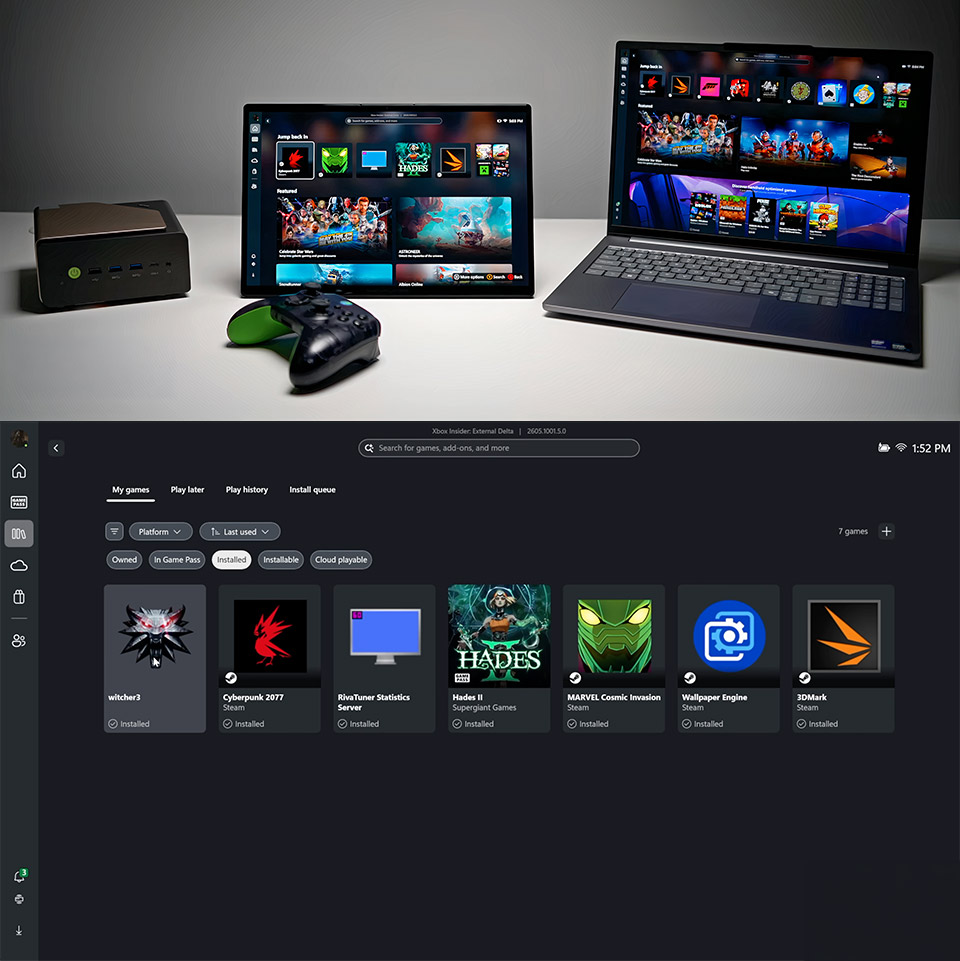
The Windows 11 Xbox Mode guide centers around enabling Microsoft’s hidden full-screen gaming experience.
The mode is designed to provide easier navigation when using a controller instead of a keyboard and mouse.
Controller-First Interface
Unlike the traditional Windows desktop, Xbox Mode focuses on controller input.
This approach makes it easier to:
• Launch games
• Browse libraries
• Access settings
• Navigate menus
• Manage gaming sessions
The interface resembles the experience found on dedicated gaming consoles.
Full-Screen Experience
Xbox Mode can be configured to launch automatically when Windows starts.
This allows users to move directly into a gaming environment without interacting with the desktop.
For living room gaming setups, this creates a more seamless experience similar to powering on a console.
Benefits of Turning a Gaming PC Into an Xbox
Many players choose this setup because it combines the strengths of both platforms.
Access to Multiple Game Stores
Unlike traditional consoles, PCs support multiple gaming platforms.
Users can access:
• Xbox Game Pass
• Steam
• Epic Games Store
• GOG
• Other PC gaming services
This provides a much larger game library.
Console Convenience With PC Power
One of the biggest advantages is combining console simplicity with PC performance.
Benefits may include:
• Higher graphics settings
• Better frame rates
• Wider hardware choices
• Upgrade flexibility
• Greater customization
This combination appeals to both casual and enthusiast gamers.
Hardware That Works Best
The Windows 11 Xbox Mode guide is especially useful for systems capable of delivering strong gaming performance.
Ideal Gaming Hardware
Recommended specifications include:
• Modern multi-core processors
• Dedicated graphics cards
• Fast NVMe SSD storage
• At least 16GB of RAM
• Reliable cooling systems
Higher-end hardware can deliver experiences comparable to premium gaming consoles.
Gaming Laptops and Mini PCs
Compact gaming systems are becoming increasingly popular because they can easily fit into entertainment setups.
Many gaming laptops and mini PCs now offer enough performance for:
• 1080p gaming
• 1440p gaming
• 4K gaming
• High refresh rate gameplay
• Advanced graphical features
These devices can function as both workstations and gaming consoles.
Future of Xbox Mode on Windows
Microsoft continues to expand the gaming capabilities of Windows.
The growing popularity of handheld gaming devices and controller-based experiences has increased interest in console-like PC interfaces.
Growing Focus on PC Gaming
The gaming industry continues to see stronger integration between Xbox and Windows ecosystems.
This trend could lead to:
• Improved gaming interfaces
• Better controller support
• Faster game launching
• Enhanced performance tools
• More console-inspired features
A Flexible Gaming Alternative
For gamers who want the simplicity of a console without giving up the advantages of a PC, Xbox Mode represents an attractive option.
As software improves, the experience may become even more polished and accessible.
FAQ
What is Xbox Mode on Windows 11?
Xbox Mode is a full-screen gaming interface that allows users to navigate their PC using a controller in a console-style environment.
Does Xbox Mode improve gaming performance?
Xbox Mode itself focuses on usability, but combining it with system optimizations may improve overall gaming responsiveness.
Can any gaming PC use Xbox Mode?
Most modern Windows 11 gaming PCs can use Xbox Mode, provided they meet software and hardware requirements.
Why use a Windows 11 Xbox Mode guide?
A Windows 11 Xbox Mode guide helps users configure their system for a more console-like gaming experience while maintaining PC flexibility.
The Windows 11 Xbox Mode guide demonstrates how modern gaming PCs can deliver a console-style experience without sacrificing performance or customization. As gaming ecosystems continue to evolve, solutions like Xbox Mode offer players new ways to enjoy the best aspects of both PC and console gaming.
PLEASE CLICK HERE FOR MORE NEWS